In our first phase on the web, we built a spatial intelligence pipeline (SPI) that worked fairly well when somebody uploaded a good handheld phone recording: a baseline view, no crazy shake or zoom, and so on. We’d find the players, estimate their poses, map them onto the court, and turn some of that into tennis events the coaching model could use. The trouble was that we did all of this after somebody uploaded the clip. If the player was too small, the camera was too far away, or the angle was unworkable, it failed. Badly.
So we became mobile developers. We wanted to make sure the video would be “coachable” and let the parent or friend filming know up front if it would work. Better, right?
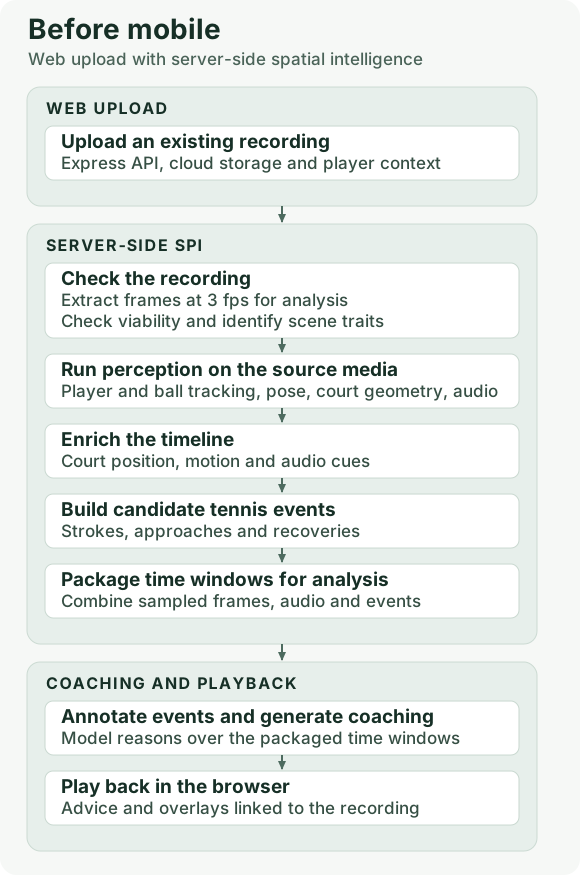
Before mobile
This was the shape of our AI video coaching architecture before we moved to mobile. A person uploaded a video to our website. The server checked whether we could work with it, ran the perception stack, and assembled a timeline. We turned things like changes in position and speed into candidate tennis events, then packaged frames, audio, and events into chunks for analysis. Then the AI coach reasoned over those chunks and turned what it found into coaching advice a player could digest.
What changed on the iPhone
We moved the first quality check to the moment before you hit record. The app could check that the camera had negotiated 60 fps, that audio and motion data were coming in, and that the person you’d tapped was visible and big enough in the frame. On the server, we could check the frame rate of the saved video from its timestamps. The live tracker could look at fewer frames, especially as the phone heated up, while the camera kept recording at 60 fps.
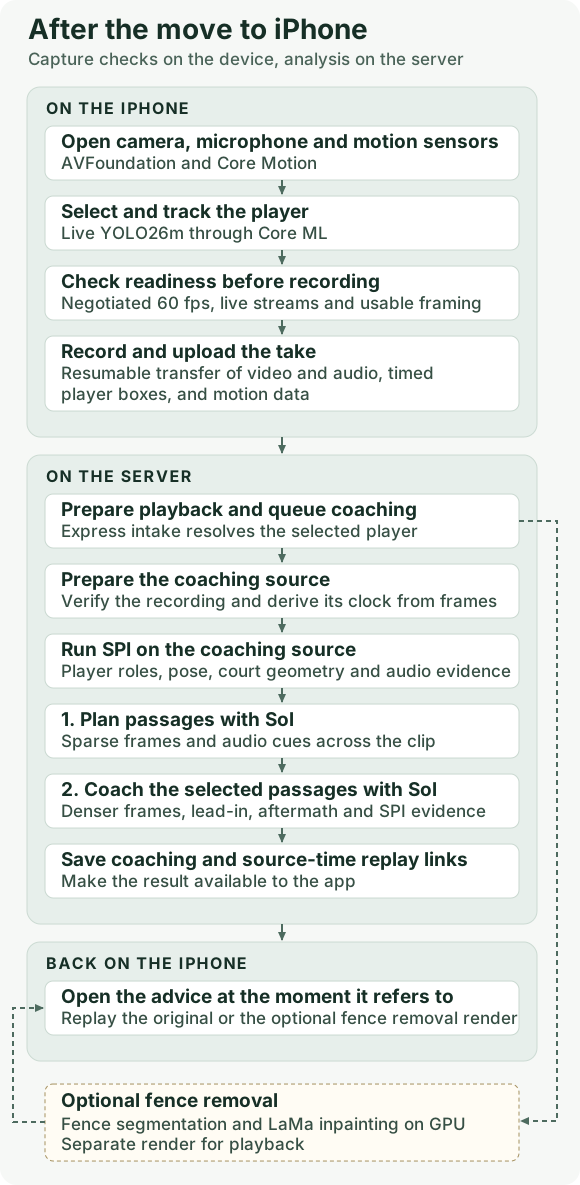
The backend evolved along with the app. The crazy pace of improvement in the models had at least as much to do with it. After a lot of testing, we ended up with a two-phase approach to coaching. First, a model made a pass over the recording to get the overall flow and suggest a sequence of events. We’d tried other ways to identify the key moments, including listening for ball contact, but noise from other courts made that unreliable on its own.
We originally used Gemini for what we called the “disposition” step, then moved to Opus when its reasoning took a leap forward in late summer. We finally settled on Sol because it outperformed everything else we tested, including Gemini Argon in our more recent tests. OpenAI’s improvements in vision, coupled with strong reasoning, made it the best fit. It certainly wasn’t the cheapest.
The second phase was the coaching itself. We fed the coach a denser set of frames around the key moments we’d identified. This was much simpler than the design we’d originally sketched out, with specialist coaches for serves, returns, and rallies. A single coach backed by a powerful model and working with all the context now outperformed our mixture of specialist coaches.
We continued to use our spatial intelligence stack as well. On the server, we’d used YOLO11m and ByteTrack to find and follow players. The phone gave us something we hadn’t had before: a record of whom the person filming actually wanted coached, along with that player’s movement. Keeping that identity through a whole point still took work, and it ended up being a far trickier problem than we’d imagined. Players left the frame. Other people walked through it. And the obvious fix for a near player who was too small, zooming in, could take the opponent out of the picture. It’s called a match for a reason. We needed both players in view to understand what happened. Getting the best view of the player we were coaching, typically the near player, often meant losing the opponent on the other side of the net. That robbed us of some of the most useful context.
The phone moved. How much did the picture move?
We thought the iPhone’s motion sensor would help us account for shaky hands. Then we discovered that Apple’s electronic stabilization was shifting and cropping the image on its own. The IMU told us how the phone moved. The recording showed what the phone had decided to do about it.
We turned off electronic stabilization and used motion readings alongside the image to decide when to smooth the court fit across frames. Our later court geometry model used HRNet to estimate court coordinates along visible lines, which helped when there were only a few intersections. Even with a fancy model that could work from sparse line intersections, a bad camera angle could still leave us with too little court to work with.
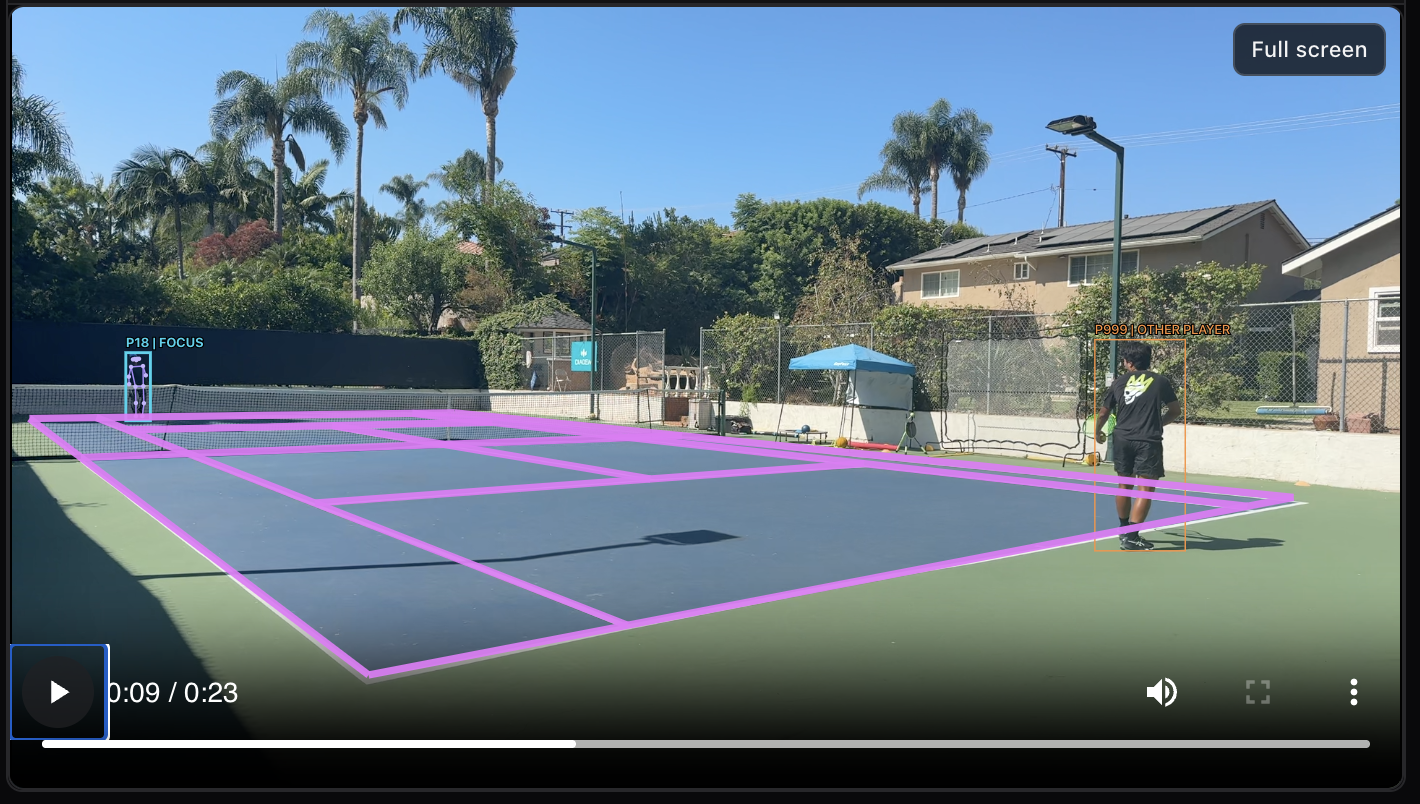
Over time, it became clear that the move to mobile was helping us control the quality of the footage. We were still facing a number of the deep-rooted problems that made producing good coaching so difficult.
Fence-Eating CNN
A chain-link fence is easy to see through in person and a pain in the ass on video. We trained a small U-Net convolutional neural network to mark the fence pixels. One part picked up the repeating pattern, and another used detail from earlier layers to trace the thin wires. Shadows and reflections off the metal made this even tougher outdoors. LaMa filled in the masked pixels to kill the fence. The playback looked slick, with a bit of tolerable flicker.
One of the more satisfying fixes was widening the mask by two pixels. Leave the edges of the wire behind and you get a ghost fence.
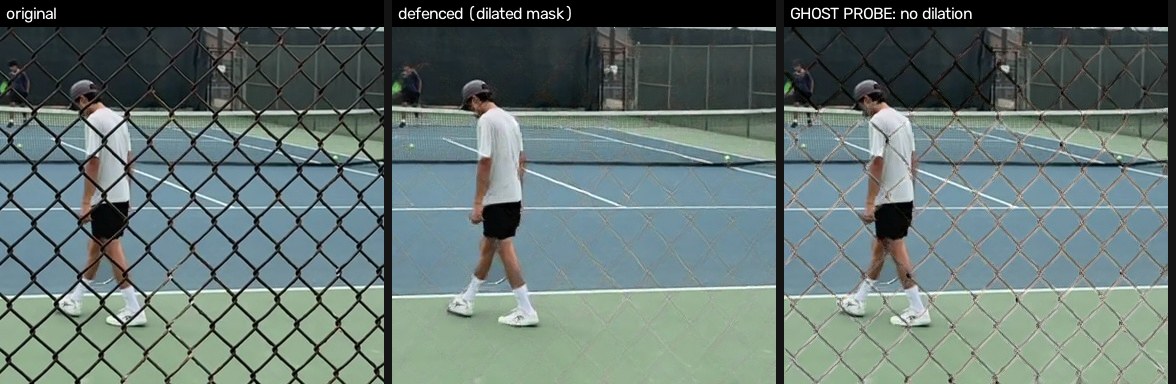
Doing this frame by frame was expensive enough to get its own GPU job. We kept it on a separate playback path. The fill made the clip easier to watch. Whatever it put behind the wire was still a guess.
The coaching was still struggling
By then we could get a reasonably well-framed recording at 60 fps, follow the selected player, and often track the opponent. We’d also gone from labeling by hand in Roboflow to using OpenAI’s Astra to help label data. That was a game changer for building examples we could test against. So how good was the coaching?
On individual clips, it could be pretty good. In one review, it picked up a backhand worth talking about against an opponent coming forward. In another, it saw a forehand hit back through the middle and called it an overhead. We were already showing the model a short passage at 24 fps, with audio, pose, and court data. It had plenty to look at and still built its advice around a shot that hadn’t happened.
There were subtler misses, too. In one clip, the opponent pulled the player wide, came in, and put away the defensive reply. The advice was to step forward and attack a floating ball. That’s reasonable advice for a different point. And even when the model had the strokes more or less right, it could spend its time criticizing a player’s mechanics when the thing worth talking about was where the player was standing. One of the biggest gaps was being able to say with confidence where the ball was.
Ball tracking is a problem in other sports, too. As with a lot of the challenges we’d been dealing with, tennis takes it to an extreme. A tennis ball is small compared with a football, a soccer ball, or a basketball. It’s small on the near side of the court. On the far side, when you’re trying to see what happened to your serve or groundstroke, it’s frequently impossible to see. A ball that’s only a few pixels across can cover a lot of distance in milliseconds. Miss a frame and it can literally disappear on you. It often leaves the frame to the side or up high, as it might on a lob or a serve toss. It hides behind nets, people, and fences. And it’s green. It gets lost in the foliage around the court, and a dark green court can leave you with almost no contrast.
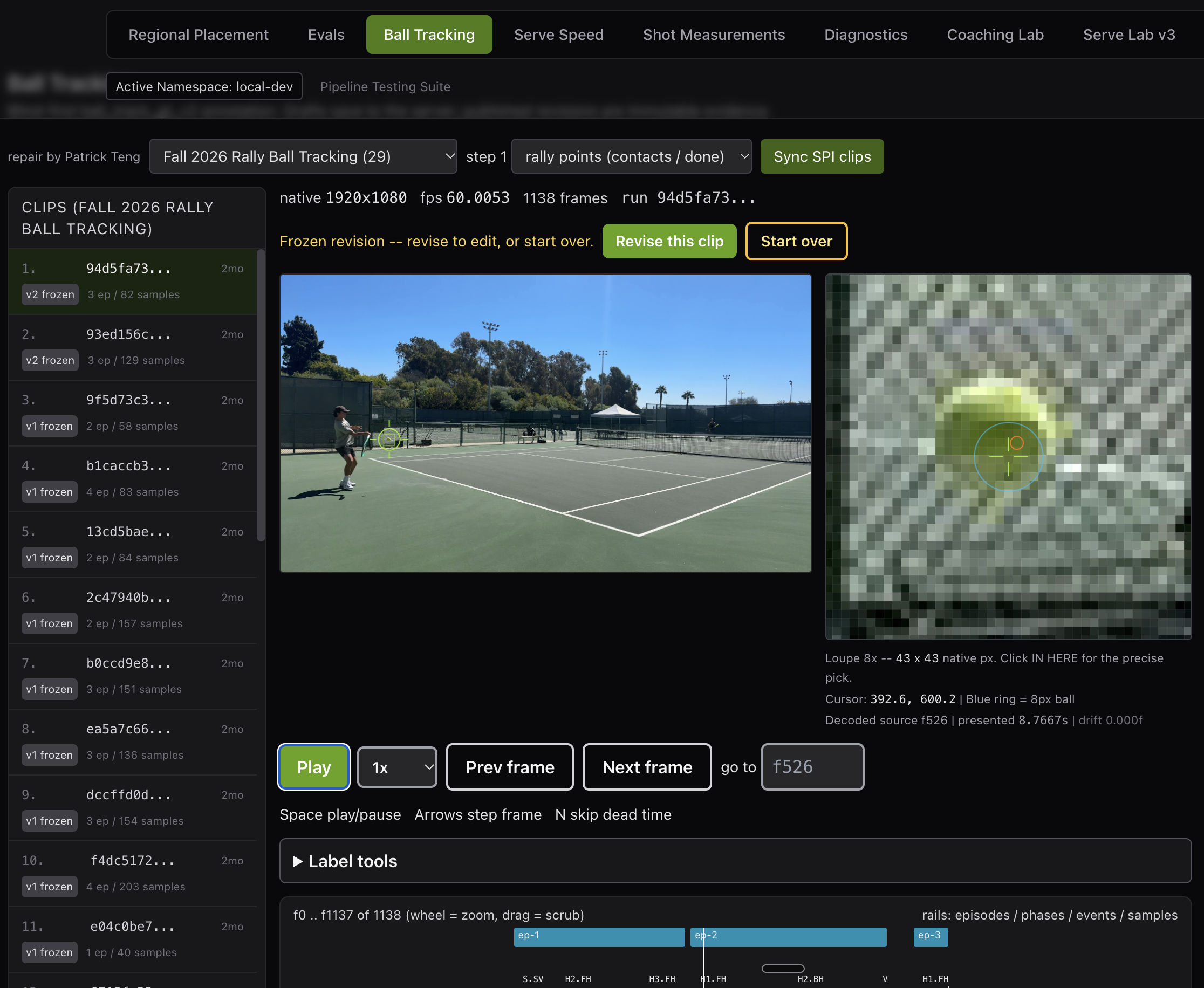
We spent months trying to get good at tracking it. We started with TrackNet, which looked at three consecutive frames resized to 512 × 288. That worked better when the ball was close. At the far baseline, it could be a few pixels across before we even shrank the image. We moved to WASB and ran it at two scales. A coarser pass covered the whole frame, and smaller crops preserved detail where we expected the ball to be tiny. We fine-tuned WASB on our own footage. In a small test on four clips held out from training, the detector found a candidate near the ball in 84 percent of labeled frames where it was visible, up from 58 percent.
That was real progress. Then we fed those detections into the same experimental tracker. It produced zero confirmed tracks with either version. The tracker still had to decide which speck in this frame was the same ball as the speck in the last one. In one longer clip, giving the tracker more candidates gave it more opportunities to settle on something nearly stationary, even though the actual ball was among the candidates. In another, an earlier version drew a smooth line from a shadow to an unrelated detection on the other side of the frame. It looked quite convincing if you watched the overlay and ignored the tennis.
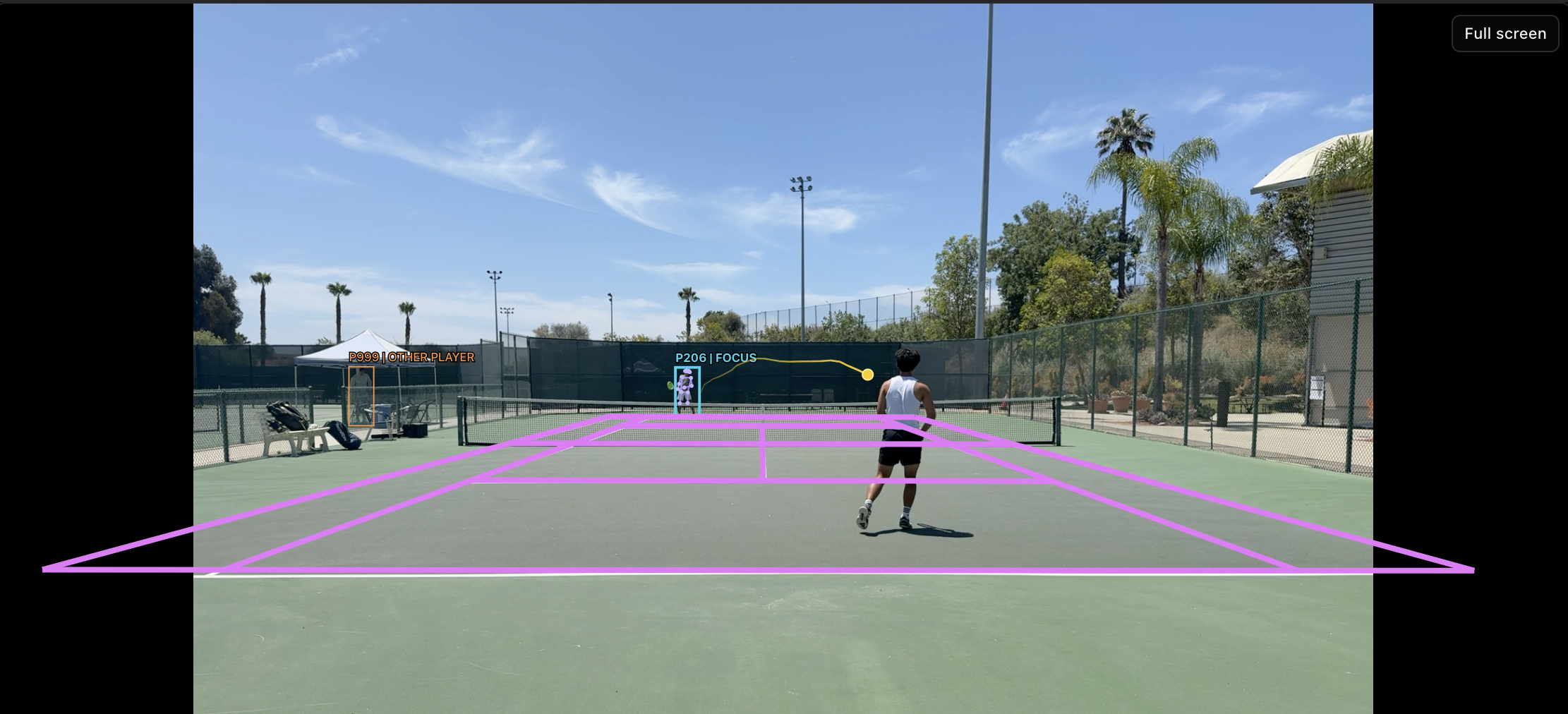
We tried looking across the whole clip to pick a plausible path, filtering out stationary detections, and using what we knew about a serve to narrow the search around the toss and contact. We also got stricter about leaving gaps. If the ball disappeared behind a player or the net, a line connecting the last thing we saw to the next thing we saw was only as good as our confidence that both were the same ball. Sixty frames per second gave us more chances to see it. We still had stretches where we couldn’t say whose racket it came off or where it landed. Eventually, we took automatic ball tracking out of the default mobile coaching run.
The lack of good ball tracking ended up being one of our biggest problems.
- We frequently couldn’t tell if a ball was in or out.
- When we couldn’t track the ball on the far side, we usually had to make a lot of assumptions about what happened based on the player’s body language and vocalizations. At that point, we were basically guessing.
- We couldn’t get reliable speeds for serves or groundstrokes.
- And forget about spin.
Even without ball tracking, better vision and reasoning in the newer models, along with usable court geometry and the rest of SPI, could produce “OK” coaching. Some of the time, anyway. It worked well enough to keep going. The logical next step was to teach the model more tennis and see if that produced a better result.
The last time we’d tried this, we used a complex semantic layer to turn SPI primitives into tennis terms. That masked some of the underlying issues with the primitives and gave us two places to tune things. This time we kept it simpler.
- We told it to use tennis terms like “deuce side” and “ad side” to describe where a player was across the court.
- We gave it the proper names for strokes, so it would say “overhead” instead of “vertical ball interception.”
- We gave it a makeshift version of the golden rules of singles, with clear examples of solid tennis strategy.
- And we gave it a few examples of what good coaching sounded like.
The result?
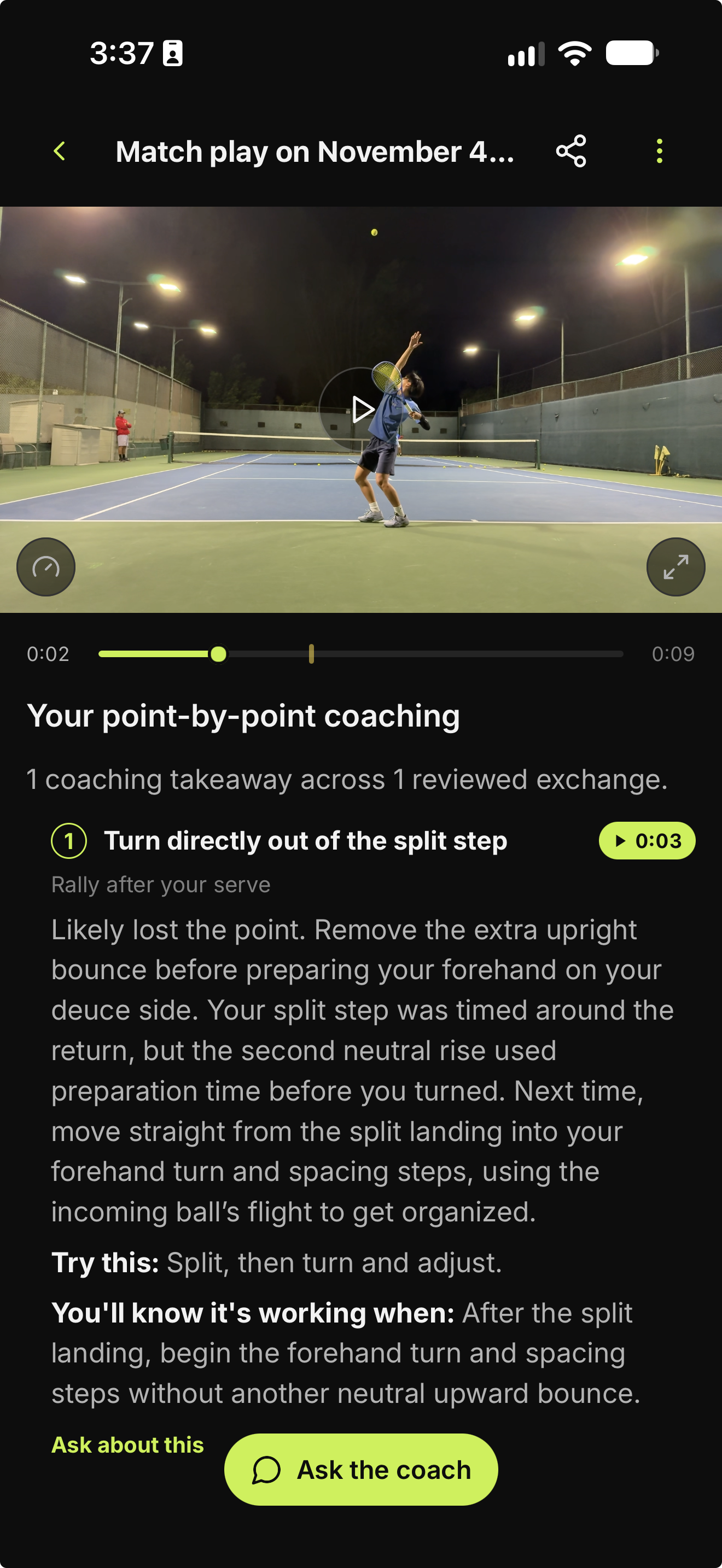
The coaching went from “OK” to “pretty good” around 70 percent of the time in our testing. Not bad, but not great. And that was after we’d scaled back our expectations to one clear coaching insight. Even with the latest models, it looked unlikely we could produce consistently high-quality coaching.
Unless, of course, someone released an amazing new model that handled video natively and was built for visual analysis. Hello, Elorian Glimpse. The next post covers our tests with Glimpse and where we landed.